

SiftLog for Android

Free  |  Requires SiftLog Platform v1.0.0+

Find the Origin of the Failure — On Your Phone, Before the Bridge Call Has Its First Status Update

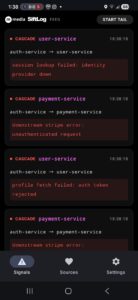
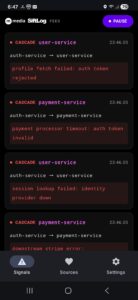
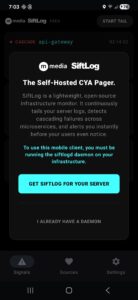
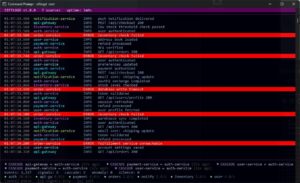
SiftLog Platform is the daemon that reads your logs, merges every source into a single time-ordered stream, and identifies which service failed first. SiftLog for Android is what you see when it finds something. Connect to your siftlogd instance over your LAN or VPN and the signal stream opens immediately on your phone. When a cascade fires, your phone knows which service started it. When a service goes silent, your phone knows. When an anomaly spikes past baseline, your phone knows — before you’ve opened a terminal.

The app connects to the live REST API built into the daemon. No cloud relay. No third-party service. Your signals travel from the daemon to your phone over your own network. The app is free. The daemon is what you are licensing.

What You See on Your Phone

  • Cascade failures. When the daemon identifies a cascade, the signal arrives on your phone with the origin service named and the propagation chain listed in order. The push notification fires immediately. The feed shows the triggering event and the direction of propagation.
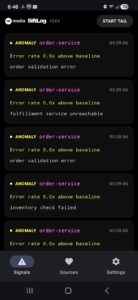
  • Anomaly rate spikes. When a service exceeds its error rate baseline, the anomaly signal shows the service name, the rate multiple, and the most recent matching event. The daemon catches it before your alerting thresholds fire — and it surfaces on your phone before you’ve checked a dashboard.
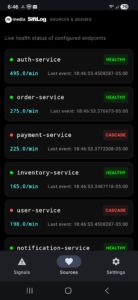
  • Service silence. When a service stops logging, the silence signal names the service and the timestamp of its last event. This is a failure mode that manual log review consistently misses. Your phone catches it.

What It Does Not Do

  • Does not detect failures — the daemon detects; the app displays what the daemon has found
  • Does not work without a running siftlogd instance with the REST API enabled
  • Does not store your log data — only the signals the daemon has already detected
  • Does not require any account, registration, or cloud service
  • Does not send your signals through any third-party server

How It Connects

Enable the REST API in your siftlog.yaml with a single flag and an API key of your choosing:

api:
  enabled: true
  port: 8080
  bind: 0.0.0.0       # or your server's LAN IP
  api_key: YOUR_KEY

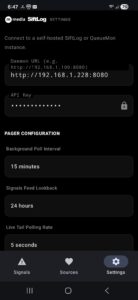
Install SiftLog on your Android device. Enter your server’s LAN IP or VPN address, port, and API key. The app connects directly to the daemon and the signal stream opens immediately. There is no account to create and no cloud service to configure.

Privacy and Air-Gapped Operation

  • No telemetry — the app does not collect, log, or transmit any data about your use
  • No account required — your connection is an IP address and an API key
  • Your signals travel from the daemon to your phone over your own network; they do not pass through any third-party server
  • For air-gapped environments: install via direct APK, connect over LAN — no Play Store or internet access required after installation

Requirements

  • Android 8.0 (API 26) or later
  • SiftLog Platform (siftlogd) v1.0.0 or later running on your server
  • REST API enabled in siftlog.yaml
  • Network access to your siftlogd instance (LAN or VPN)

Free. Always.

SiftLog for Android has no in-app purchases, no subscriptions, and no ads. The app is the free companion to SiftLog Platform. The daemon is what you are licensing.

Direct APK Download

For air-gapped networks, managed device environments, or anywhere Google Play is unavailable. Signed with the M Media release certificate.

SHA-256: 156f26fbfe09d2646be844c5fd9bef91ea9b5b80a63fba5ab3d2e39a72cccd96

Free companion to: SiftLog Platform   
Support: support@mmediasoftwarelab.com   
Play Store: Google Play

Download
SSL Secure
Stripe
PayPal
Money-Back Guarantee
Subscription Hell
  • • Payment fails? App stops
  • • Need online activation
  • • Forced updates
  • • Data held hostage
M Media Way
  • • Buy once, own forever
  • • Works offline
  • • Optional updates
  • • You control your data

Simple Licensing. No Games.

We don't believe in dark patterns, forced subscriptions, or holding your data hostage. M Media software products use clear, upfront licensing with no hidden traps.

You buy the software. You run it. You control your systems.

Licenses are designed to work offline, survive reinstalls, and respect long-term use. Updates are optional, not mandatory. Your tools don't suddenly stop working because a payment failed or a server somewhere changed hands.

One-time purchase, lifetime access
No "cloud authentication" breaking your workflow
Upgrade when you want to, not when we force you
Software empowers its owner — not rent itself back
🤖
Support Bot
"Have you tried restarting your computer? Please check our knowledge base. Your ticket has been escalated. Estimated response: 5-7 business days."
❌ Corporate Script Theater
👨‍💻
Developer (M Media)
"Checked your logs. Line 247 in config.php — the timeout value needs to be increased. Here's the exact fix + why it happened. Pushed a patch in v2.1.3."
✓ Real Technical Support

Support From People Who Understand the Code

Ever contact support and immediately know you're talking to someone reading a script? Someone who's never actually used the product? Yeah, we hate that too.

M Media support means talking to developers who wrote the code, understand the edge cases, and have probably hit the same problem you're dealing with. No ticket escalation theatrics. No "have you tried restarting?" when your question is clearly technical.

Documentation written by people who got stuck first. Support from people who fixed it.

We don't outsource support to the lowest bidder or train AI on canned responses. When you ask a question, you get an answer from someone who can actually read the logs, check the source code, and explain what's happening under the hood.

Real troubleshooting, not corporate scripts
Documentation that assumes you're competent
Email support that doesn't auto-close tickets
Updates based on actual user feedback